DrillDownWrapper — Directory of Files (with Rename)
examples/13_directory_drilldown.py · run it with uv run python examples/13_directory_drilldown.py
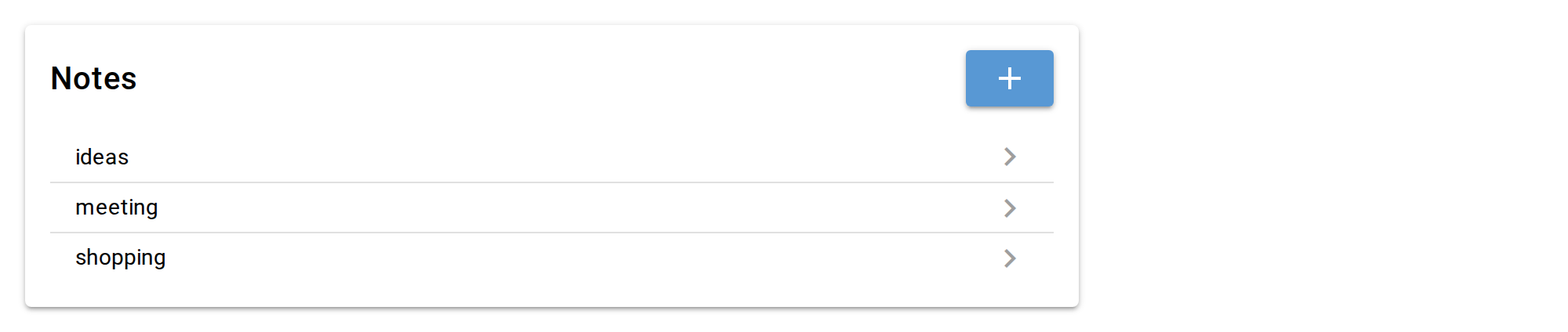
DrillDownWrapper's two first-class use cases: a JSON list inside one file (see
09_drilldown.py) and, here, one file per item in a directory. DirectoryAdapter
models the directory — each item is just filename metadata (FileEntry), not the
parsed content. The actual note text lives in its own JsonAdapter per file,
opened lazily inside render_detail.
Renaming is not a wrapper feature — it's just a "Name" input wired to
DirectoryAdapter.rename(), reporting the new key back via the set_key
callback so DrillDownWrapper's navigation state (title, Back target) stays in
sync. Add is overridden via on_add, which here is async def: a note needs a
filename, so the handler asks for one with input_dialog() and only creates the
file once it has an answer. on_add and on_back may be written either way —
a plain def when there is nothing to wait for, async def when there is.
Source
"""
# DrillDownWrapper — Directory of Files (with Rename)

DrillDownWrapper's two first-class use cases: a JSON list inside one file (see
09_drilldown.py) and, here, one file per item in a directory. `DirectoryAdapter`
models the directory — each item is just filename metadata (`FileEntry`), not the
parsed content. The actual note text lives in its own `JsonAdapter` per file,
opened lazily inside `render_detail`.

Renaming is not a wrapper feature — it's just a "Name" input wired to
`DirectoryAdapter.rename()`, reporting the new key back via the `set_key`
callback so DrillDownWrapper's navigation state (title, Back target) stays in
sync. Add is overridden via `on_add`, which here is `async def`: a note needs a
filename, so the handler asks for one with `input_dialog()` and only creates the
file once it has an answer. `on_add` and `on_back` may be written either way —
a plain `def` when there is nothing to wait for, `async def` when there is.
"""
import datetime
from pathlib import Path

import pydantic
from nicegui import ui

from niceview import DirectoryAdapter, FileEntry, JsonAdapter, ModelForm, DrillDownWrapper
from niceview.util import input_dialog


class Note(pydantic.BaseModel):
    text: str = pydantic.Field(default='', title='Text')


NOTES_DIR = Path('./example_notes')
NOTES_DIR.mkdir(exist_ok=True)

directory = DirectoryAdapter(NOTES_DIR, default_content=Note().model_dump_json())


def render_note_detail(adapter: DirectoryAdapter, key: str, set_key) -> None:
    def do_rename() -> None:
        try:
            set_key(adapter.rename(key, name_input.value))
        except ValueError as e:
            ui.notify(str(e), type='negative')

    name_input = ui.input('Name', value=key).classes('w-full').props('outlined dense')
    name_input.on('blur', do_rename)

    note_path = NOTES_DIR / f'{key}.json'
    form = ModelForm.from_adapter(Note, JsonAdapter(Note, note_path), autosave=True)
    form.render_field('text', widget_type='ui.textarea').classes('w-full').props('outlined')
    form.render_nonfield_errors()


@ui.page('/')
def page():
    ui.markdown(__doc__ or '')
    ui.separator()

    async def handle_add() -> None:
        # async on_add: the dialog is awaited inside the Add click, so nothing is created
        # until the user answers -- and Cancel simply leaves the list untouched.
        name = await input_dialog('New note', label='Name', placeholder='my-note',
                                  validator=lambda v: bool(v) and '/' not in v,
                                  error_message='Name must not be empty or contain "/"')
        if name is None:
            return  # cancelled
        try:
            # create() only reads .name off the item; mtime/size come from the file it writes.
            entry = directory.create(FileEntry(name=name, mtime=datetime.datetime.now(), size=0))
        except ValueError as e:  # name already taken, or not a usable file name
            ui.notify(str(e), type='negative')
            return
        wrapper.open(entry.name)

    with ui.card().classes('w-full max-w-2xl'):
        wrapper = DrillDownWrapper.from_adapter(
            FileEntry, directory,
            title='Notes',
            item_title_field='name',
            item_subtitle_fields=[],
            on_add=handle_add,
            render_detail=render_note_detail,
        )
        wrapper.render()


ui.run(title='13 — Directory Drill-Down')